[>=13] is a simple condition. In the UK, if a person is 13 or over they can “lawfully provide their own consent for the processing of their personal data” (ICO). This means they are also entitled to a range of other data protection rights, some solely specific to those under 18, such as high privacy by default and age-appropriate features. Though the age of consent may vary depending on the member state, in the EU, similar data protections apply. So this simple condition can have a high impact on digital products and services used (or likely to be used) by children and young people.
Furthermore, children are everyone’s business. Everyone has a perspective on what childhood should be and what children and young people ought to be doing in it. Considering ethics and public sentiment can be a great way to navigate tricky challenges, innovate purposefully, and take responsibility for both the positive and negative impact technology can have.
So here are a few example activities of how I’ve integrated children’s digital rights and ethics into projects designing digital products and services for those under 18.
First, for context, in all of my projects (and therefore their activities), there are three things I strive for:
- Designing sustainable solutions that can endure ever-changing user, business and tech needs, scale and develop within the lifecycle of the service, be reused across a suite of products and be integrated into a Design System. Leaving room for future applications and showing how a pattern may evolve over time is helpful when justifying the resources you might need to implement a solution now.
- Being resourceful with time and tools, I make sense of project learnings and summarise as I go, usually having a running project document/presentation/prototype. This allows you to share, at any point, your current rationale succinctly and tailor it to who you are communicating with. Unless there’s a very good reason, I also tend to use whichever prototyping, interface design or digital whiteboard tools my clients have available to them, and prefer being set up with internal systems. This ensures all project outputs are accessible to everyone in my client’s organisation, avoids getting stuck in internal security system blocks shenanigans, and it’s safer from a data privacy and protection point of view, especially if dealing with children’s data collected during research.
- Increasing confidence among stakeholders and those responsible for “the go-head”. I work towards what they need to achieve and what needs to be in place for the successful implementation of a solution.
Second, let’s look at an example project approach and plan, to get a sense of how it all might work together.
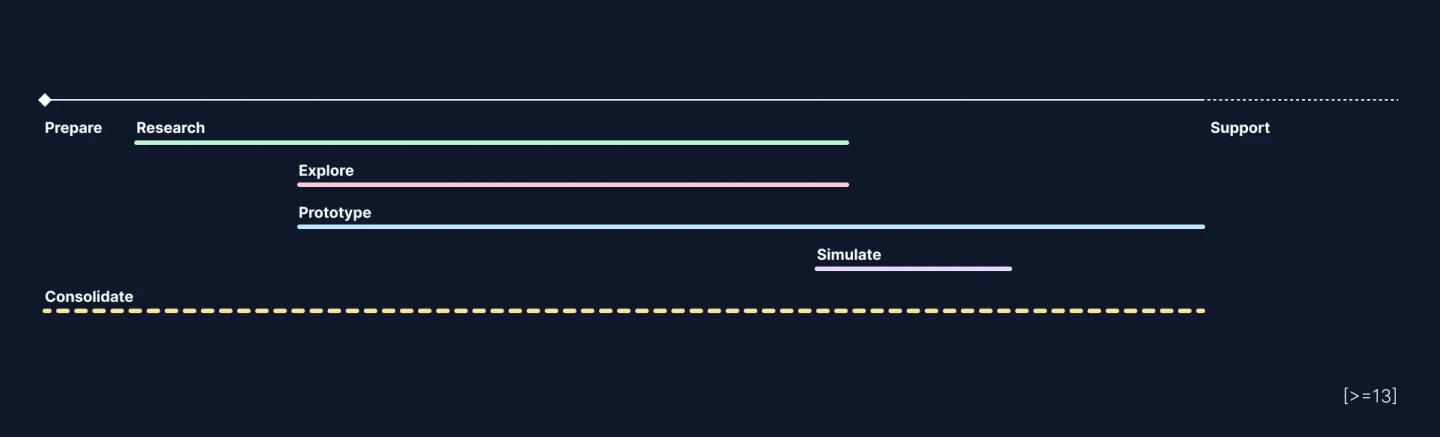
When it comes to ‘when’ it’s a good time to design for and act on children’s digital rights and ethics within a project, I would say all the time. This is a lens through which you may view your project at any point. The amount of time I spend on each activity and phase, and the types of outputs that originate at each moment will greatly depend on the needs of the client, stakeholders and team I’m working with, and any resources available for the project. So at this point, I will leave that in the open. Here’s a short run-through of general activities:
Prepare
Define and identify:
- brief;
- scope;
- outcomes;
- outputs;
- previous and upcoming work;
- stakeholders;
- target users, behaviours, and needs.
Research
→ Scan policy, regulation and public opinion and research;
→ Scan best and worst practices in the industry (and internally);
→ Analyse and identify current usage patterns (devices, journeys, traffic, time spent);
→ Research user needs, goals and attitudes.
Explore
→ Prioritise use cases for exploration;
→ Ideate, sketch and prototype;
→ Identify opportunities and requirements with stakeholders;
→ Map core user journey, lifecycle and service.
Prototype
→ Bring core journey and service touch points to life;
→ Visualise variant use cases and scenarios.
Simulate
Undertake research with potential users by simulating main journeys, use cases and scenarios.
Consolidate
I’m certainly better at communicating clearly when I’ve had the chance to write down what I’m learning and what it means for what we’re designing, so I tend to do this throughout the project. Towards the end of a project, I start creating outputs that are helpful to post-project activities, this is usually much faster because I’ve done most of the sense-making already, and so it becomes about crafting the right information, being clear about what we know and what we don’t know, and iterating on the prototype so it can stand alone without the need for me to demo it to others.
Finally, here’s how I practically apply children’s digital rights and ethics to projects designing digital products and services for those under 18.

Define a clear brief, scope, outcome/output
Why?
Setting a brief seems obvious but often creates misalignments and disappointment when it leaves a lot unsaid. This is not necessarily a binding contract at the start of your project, but a collaborative tool to help set boundaries and expectations within a team, and it can even be updated throughout the project.
How?
Alongside the regular information, here are some points I usually add:
Context: why now, what previous work has been done and what is happening in this industry.
Goal: project-specific aims and how they relate to the organisation’s mission.
Scope: specify parameters and requirements that may be subject to differences in policy, regulation, public attitude, and capability. For example:
- User age range and location;
- Types of user personal data collected and used;
- Technology;
- Sector (e.g. health care, finance, etc);
Dependencies: potential concerns, stakeholders to be involved, other products, services or features that need to be in place, stakeholder presentations and key dates.
Example outputs: I prefer to think about the handover and what will need to be done after the project is over. Maybe there will be the need to raise investment, maybe its stakeholder approval or a specific internal protocol to get a project rolling, or getting ready to build! These post-project activities need specific information and artefacts, so I tend to create outputs that can be easily utilised or repurposed.
Output
A clear guiding document that the team collaborated and agreed on, and can refer back to at any point.
Scan policy, regulation and public opinion and research
Why?
Being aware of existing and upcoming regulations allows you to explore what impacts they may have on your user experience and the way your digital service is delivered. This way you can have an intentional and well-designed implementation and avoid the need for a quick patch to meet regulatory requirements. It’s good to have an understanding of what is relevant for everyone, and what is specific if your users are likely to be children.
How?
This can take anywhere from a couple of hours to a few days if you are doing a more in-depth review, it will depend on the focus of your project and how much time you have available. I prefer to progressively do it throughout the project so I can sketch and prototype any user experience implications along the way.
There are a few resources I revisit frequently for regulation and policy related to tech and children:
- Age appropriate design: a code of practice for online services by the UK’s Information Commissioner’s Office;
- UNCRC General comment №25 (2021) on children’s rights in relation to the digital environment;
- COPPA United States Children’s Online Privacy Protection Act, because it can have a great impact of tech services used globally;
- and the Global AI Regulation Tracker for a sense of what exists and what is emerging worldwide.
For a sense of public opinion and research, I search on news websites, Google Scholar, and places where people share their opinions online (Reddit, X and other social media). I might also look at the latest work of experts in the field like dana boyd and Sonia Livingstone.
For a peak into children and young people’s lived experiences and perceptions, I may look at:
- Ofcom 2022 research;
- Our Rights in the Digital World A Report on the Children’s Consultations to inform UNCRC General Comment 25;
- Adolescent Perspectives on Artificial Intelligence;
- Global Kids Online: Growing up in a connected world.
When I’m scanning I search for mentions of age, children, young people, as well as privacy and domain-specific topics (for example if you are designing a health service, you may also want to have a look through any regulation related to health care).
Output
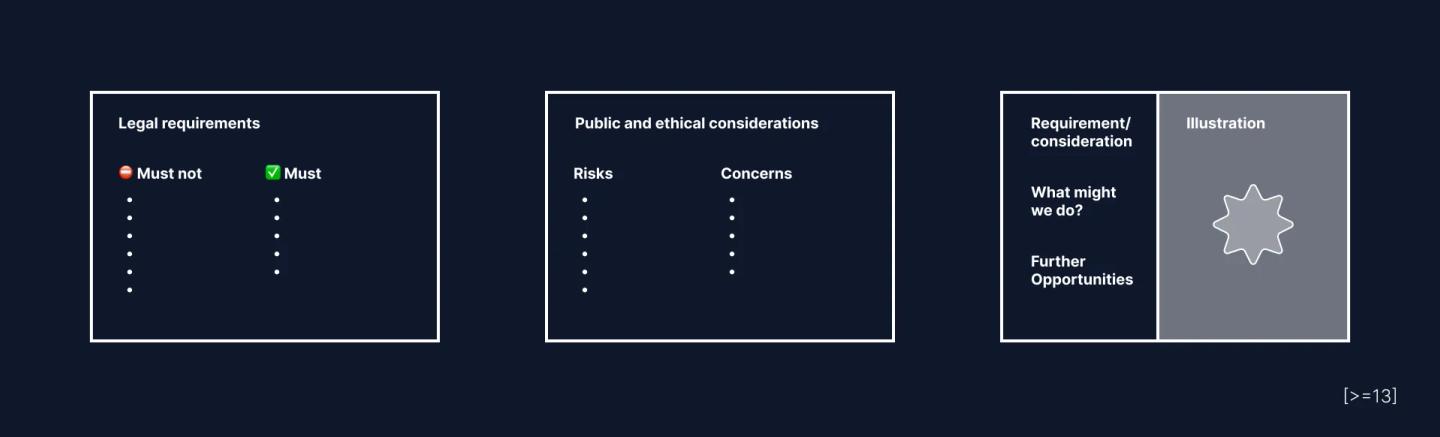
As you look through resources succinctly write down the requirements and considerations in your own words, in clear plain language, on simple bullet points. Keep a link to the source to allow others to more easily understand how you got to this point.
Illustrating the requirements, either through sketches, prototypes, diagrams or screenshots of industry examples, helps make nuances easier to understand and feedback on for teammates and stakeholders.
To be continued with:
- Scanning best and worst practices in the industry;
- Prototyping and bringing concepts to life;
- Thinking systemically and creating an all-encompassing picture of the challenge;
- Involving critical and expert stakeholders from the beginning;
- Test with children and young people;
- Being an optimistic doomsday prepper;
- Ethical practices when designing for children and young people.